
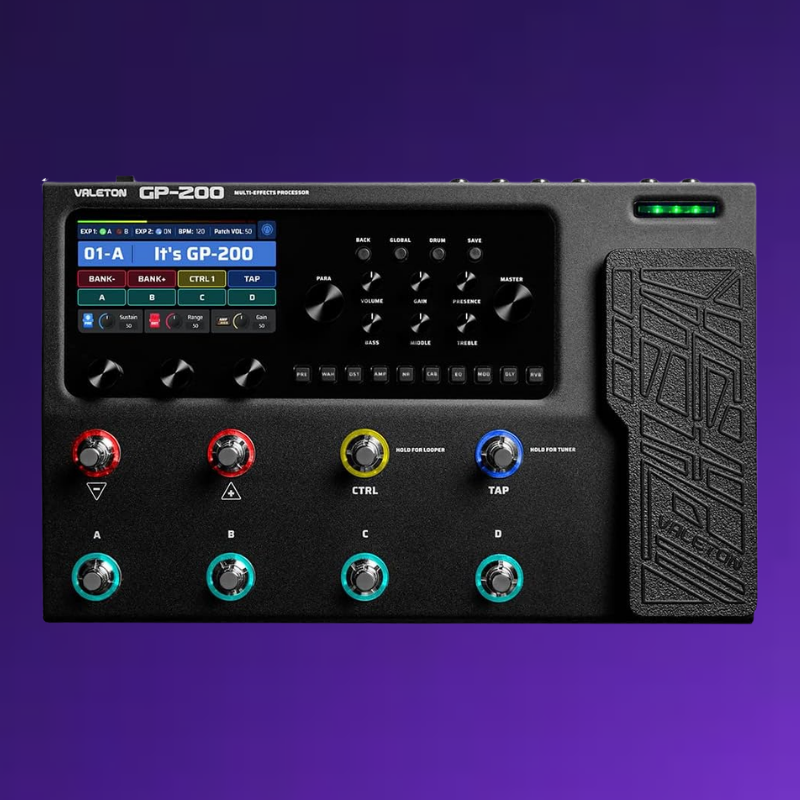


Description
1. LCD Display: 4.3” colour LCD.
2. PARA Knob (with enter button): Turn to select menus and adjust parameters.
3. MASTER Knob: Turn to control main output volume.
4. BACK Button: Press to return to the previous.
5. GLOBAL Button: Press to enter the Global Setting menu.
6. DRUM Button: Press to play the drum. Hold to enter the Drum Machine Edit menu.
7. SAVE Button: Use SAVE button to store, rename, or copy the patch.
8. AMP Knobs: Control the AMP module in real time just like a real amp.
9. Module Buttons: Press to enter the Edit Settings menu of module. Press and hold for module on/off.
10. Quick Access Knobs: Turn to adjust parameters on the lower part of the screen.
11. 8 Footswitches: Use to change patches, turn on/off effects, set tap tempo, etc.
12. Expression Pedal: Use to control the parameter of one or several effects.
13. EXP/FS Jack: 1/4” TRS input, for connecting an external expression pedal/footswitch controller.
14. INPUT Jack: 1/4” Mono input connection for guitar or other instruments.
15. AUX IN Jack: 1/8” TRS input for connecting an audio player and playing along (or recording).
16. FX LOOP (SEND/RETURN) Jack: These 1/4” jacks can be used as FX loop for inserting external stompboxes into your tone.
17. UNBALANCED OUTPUT (L For Mono Output): Use 1/4” TS cables to connect to your guitar amp, FRFR speaker(s), or other playback system.
18. GND/LIFT Switch: Turn the GND/LIFT switch to GND to cut off the ground connection of the two XLR connectors (Ground Lift) to avoid noise caused by the Ground Loop. Turned to LIFT, the XLR line will be ground normally.
19. BALANCED OUTPUT (L For Mono Output): Use balanced XLR cables to connect to your studio gear, mixer, PA, or FRFR speaker(s).
20. PHONES Jack: 1/8” TRS output for connecting headphones.
21. MIDI Jacks: Connect an external MIDI device here.
22. USB Jack: By connecting USB 2.0 Type-C to Mac and Windows computers, GP-200 also functions as a high quality audio interface with DI, Re-amping and MIDI functionality built right in.
23. POWER Switch: Turn the power on.
24. DC 9V Jack: Power Requirements: DC 9V, 1000mA.




Reviews
There are no reviews yet.