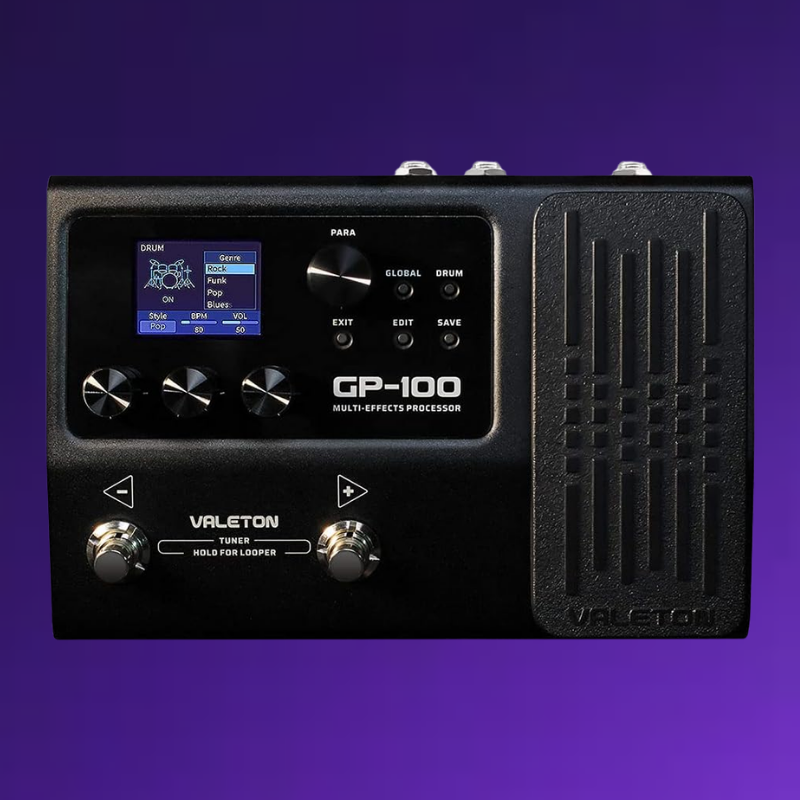
| 1.LED Display |
This display shows GP-100’s the patch numbers, patch name, and other operation information. |
| 2.PARA knob -with enter button |
Turning or pressing this knob allows you to change menus and adjust parameters. |
| 3.GLOBAL button |
Press this button to enter the global setting menu, where you can edit the global parameters of the GP-100 |
| 4.DRUM button |
Press this button to play the drum. Hold this button to enter the Drum Machine Edit menu. |
| 5.EDIT button |
In any menu, press this button to enter the Edit Settings menu. |
| 6.SAVE button |
Use this button to store, rename, and copy the preset. |
| 7.EXIT button |
In any menu, press this button to return to the main interface. |
| 8.Quick Access Knobs |
Use to adjust parameters on the lower part of the screen. Each knob will vary in function according to the parameter on the display. |
| 9.Expression Pedal |
Use to control the parameter of one or several effects, including output volume. |
| 10.Footswitch |
These footswitches are used for controlling the tuner, preset scrolling, start/stop/record phrases, and other functions. Their function will depend on the footswitch mode you are currently using. |
| 11.Input |
1/4″ mono input |
| 12.Output |
1/4″ stereo outputs |
| 13.Aux In |
Stereo 1/8″ Aux Input |
| 14.Output |
1/8″ headphone output |
| 15.USB |
2.0 Type-B port |
| 16.Power |
DC 9V power supply |

Reviews
There are no reviews yet.